
Web Application Firewall
The Firewall is an ordered list of rules that run for every request matching a route in the project. Each rule has an expression and an action — block, log, or allow.
The Firewall page#
The Firewall tab lists every zone in the project (one per location), with its status, description, rule count, and a 24-hour match sparkline so you can see how busy each rule has been.
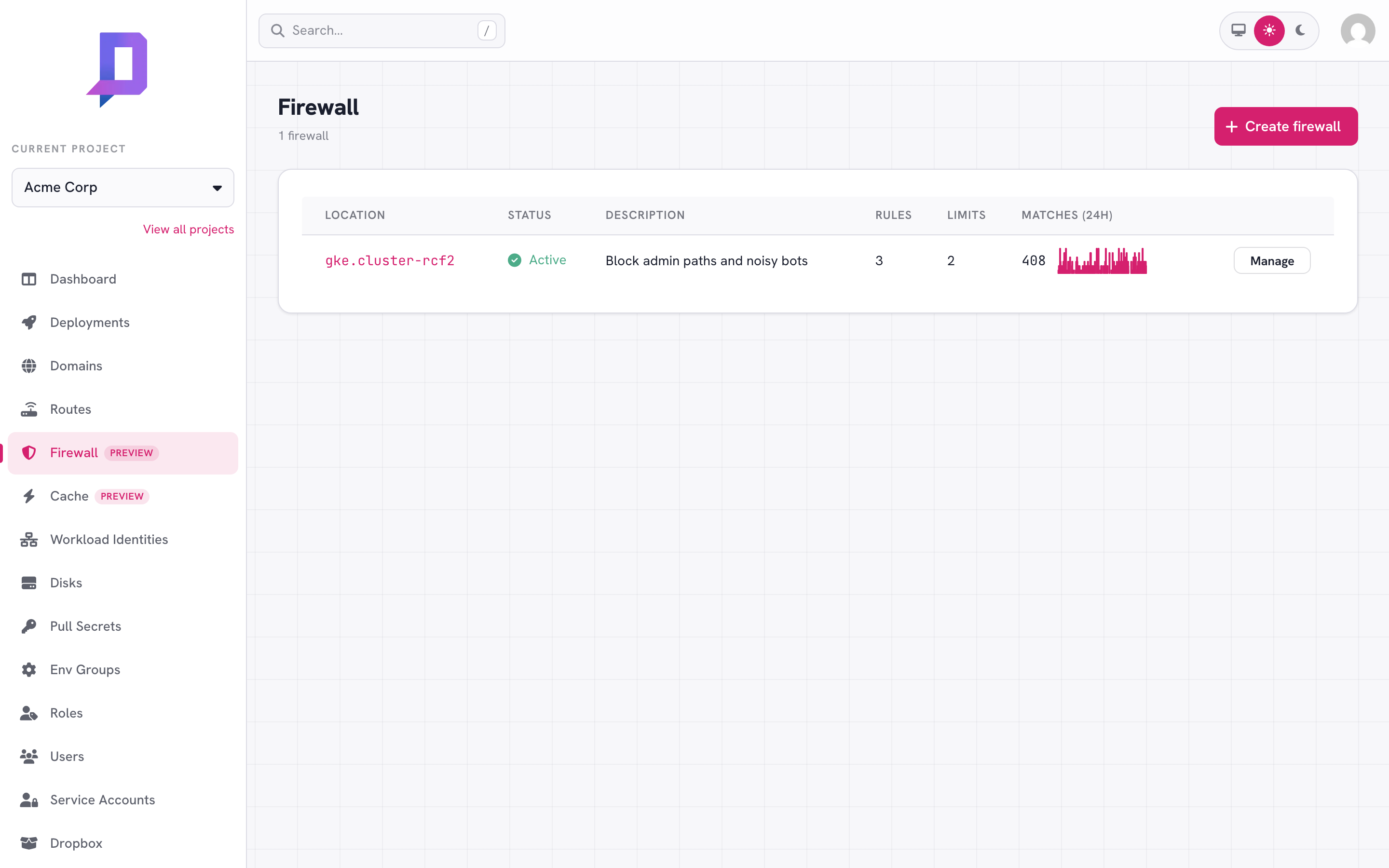
Click Manage to view, edit, and reorder the zone’s rules.
How rules work#
Rules evaluate in priority order — lowest priority number first. The first rule whose expression matches the request decides the outcome:
| Action | Effect |
|---|---|
block | Return the configured status (default 403) and stop. The request never reaches your deployment. |
log | Record a match in metrics and continue evaluating later rules. |
allow | Stop evaluating and forward the request to the deployment, bypassing later rules. |
A request that doesn’t match any rule is forwarded normally.
{
  "id": "block-admin",
  "description": "Block external access to /admin",
  "expression": "request.path.startsWith('/admin')",
  "action": "block",
  "status": 403,
  "message": "Forbidden",
  "priority": 10
}
The expression language#
Rule expressions are small boolean expressions over the request. Common references:
request.path— the URL path (string).request.method—GET,POST, …request.remote_ip— the client IP as seen by the gateway.request.headers['name']— a header value (string), lowercased name.request.host— the request hostname.
Operators: ==, !=, &&, ||, !, plus the string helpers
.startsWith(s), .endsWith(s), and .contains(s), and
ipInCidr(ip, cidr) for network matching.
request.path.startsWith('/admin')
request.headers['user-agent'].contains('bot')
request.remote_ip == '203.0.113.7'
ipInCidr(request.remote_ip, '203.0.113.0/24')
request.path.endsWith('.php') && !request.headers['x-internal'].contains('yes')
One more is available on top of the engine’s own functions:
ipInList(request.remote_ip, "list-name") matches against a
named IP list — it’s a platform macro, expanded into
ipInCidr checks before your rules reach the gateway.
Patterns#
Always allow your own egress IPs. Stick an allow rule with low priority
at the top of the zone so good traffic short-circuits the rest of the rules.
priority 10 — allow — ipInList(request.remote_ip, "office-ips")
priority 50 — block — request.path.startsWith('/admin')
priority 90 — log   — request.headers['user-agent'].contains('bot')
Roll out new blocks safely. Add a rule as log first, watch the matches
on the metrics page for a day, then flip it to block once you’ve confirmed
it’s catching what you expect (and not what you don’t).
Rate limiting#
Alongside the block/log/allow rules, a zone can carry rate limits — counters that reject (or just watch) traffic arriving faster than a threshold. Limits are independent of the rules: they’re evaluated for every request the zone covers, so a request that passes every rule can still be rejected by a limit.
A limit sorts requests into buckets and rejects a bucket once it exceeds
rate requests per window. What defines a bucket is the key:
| Key | One bucket per |
|---|---|
ip | client IP (the default) |
host | request hostname |
asn | client network (autonomous system number) |
country | client country |
header:<name> | value of a request header |
cookie:<name> | value of a cookie |
List several to bucket on the combination — ["ip", "host"] limits each IP
per host. With no key the limit defaults to ["ip"].
Limits live on the same zone as the rules. Set them with waf.set, in a
limits array next to rules — and, like the rules, waf.set replaces the
whole zone, so send the full limits list every time:
"limits": [
  {
    "description": "100 req/min per IP",
    "key": ["ip"],
    "rate": 100,
    "window": "1m"
  },
  {
    "description": "Throttle login to slow credential stuffing",
    "key": ["ip"],
    "rate": 5,
    "window": "1m",
    "filter": "request.path == '/login' && request.method == 'POST'",
    "status": 429,
    "message": "Too many attempts — slow down."
  }
]
Each limit understands:
| Field | Meaning | |
|---|---|---|
rate | required | Max requests per window per bucket (> 0). |
window | required | Go duration, 1s–1h (e.g. 30s, 1m, 1h). |
key | optional | Bucket characteristics (above); default ["ip"]. |
algorithm | optional | fixed (default) fixed window, or sliding for a smoother rolling window. |
mode | optional | enforce (default) rejects; shadow only counts — see below. |
status | optional | Response status when limited: 429 (default) or 503. |
message | optional | Response body when limited (default Too Many Requests). |
filter | optional | A CEL expression (the same request.* surface as rule expressions) scoping the limit to matching requests; empty means every request. A filter that errors at runtime fails open — the limit is skipped — so a bad filter can’t reject good traffic. |
A zone holds up to 20 limits.
Size a limit in shadow mode first. Set "mode": "shadow" and the limit
counts matches without rejecting anything. Watch the limited share on the metrics
page for a day or two, confirm the threshold only catches abuse, then flip it to
enforce. It’s the rate-limit equivalent of rolling out a rule as log before
block.
Named IP lists#
Writing the same CIDRs into every rule gets old fast — and with the 2048-char expression cap, a block list of more than ~40 networks doesn’t fit in one rule at all. Named IP lists are reusable sets of IPs and CIDRs, defined once per project and referenced from any rule expression or limit filter in any of the project’s zones. Edit the list, and every zone that uses it is re-applied.
Typical uses: an office/VPN allowlist shared across every location, a botnet block list too big for an inline expression, or exempting your monitoring ranges from a rate limit.
Lists have their own permission family — wafList.list, wafList.get,
wafList.set, wafList.delete (camelCase, unlike most permissions) — which an
existing waf.* grant does not cover. Grant wafList.* alongside waf.*
for roles that manage the firewall, or the
lists page and the list picker stay permission-blocked.
Creating a list#
In the console, the IP lists button on the Firewall page opens the lists page — a table of the project’s lists with entry counts and the zones referencing each, plus create/edit and delete. The same operations via the CLI:
deploys wafList set \
  --project acme \
  --name office-ips \
  --entry 203.0.113.0/24 \
  --entry 198.51.100.7 \
  --entry 2001:db8::/48
Entries are IPv4/IPv6 addresses or CIDRs, mixed freely. set replaces the
whole list (like waf.set replaces the whole zone), so send every entry each
time. For longer lists, --entries-file ips.txt reads one entry per line
(# comments are stripped), and -f list.yaml takes the full payload as YAML.
deploys wafList list --project acme
deploys wafList get --project acme --name office-ips
deploys wafList delete --project acme --name office-ips
Entries are normalized on save: CIDRs are masked to their network address
(10.1.2.3/8 stores as 10.0.0.0/8) and IPv6 is compressed to canonical form.
Duplicates after normalization are rejected.
Referencing a list#
Use ipInList(<field>, "<list-name>") anywhere a rule expression or limit
filter goes. The list name must be double-quoted; negate with ! like any
other boolean:
"rules": [
  {
    "description": "office allowlist",
    "expression": "ipInList(request.remote_ip, \"office-ips\")",
    "action": "allow"
  }
],
"limits": [
  {
    "description": "api limit",
    "key": ["ip"],
    "rate": 600,
    "window": "1m",
    "filter": "!ipInList(request.remote_ip, \"office-ips\")"
  }
]
In the console, the rule and limit builders offer in IP list / not in IP list operators with a picker over the project’s lists.
waf.set rejects an expression referencing a list that doesn’t exist, so
create the list first.
How expansion works#
ipInList is a platform macro, not an engine function. Your zone stores
exactly what you wrote — waf.get and the console round-trip the macro form —
and the platform expands it into plain ipInCidr checks when it applies the
zone to a location:
ipInList(request.remote_ip, "office-ips")
   ↓
(ipInCidr(request.remote_ip, "203.0.113.0/24") || ipInCidr(request.remote_ip, "198.51.100.7/32") || ipInCidr(request.remote_ip, "2001:db8::/48"))
Bare addresses expand as exact matches (/32 for IPv4, /128 for IPv6). An
empty list never matches — ipInList over it is simply false — so a
freshly created placeholder list is safe to reference from either an allow
or a block rule.
Editing a list re-applies every zone that references it, in every location — watch the zones flip to Pending and back to Success on the Firewall page. A list edit that would push any referencing zone past the expansion caps (below) is rejected whole, naming the offending zone and rule, and nothing changes anywhere.
Caps#
| Limit | Value |
|---|---|
| List name | 3–26 chars; lowercase letters, digits, and hyphens, starting with a letter and ending with a letter or digit |
| Lists per project | 20 |
| Entries per list | 1000 |
| Entry length | 64 chars |
| Expanded expression size | 64 KiB |
| Expanded ruleset size (rules and limits, each) | 512 KiB |
The stored expression cap (2048 chars) applies to what you write — a macro
reference is ~45 chars, so list size no longer pushes against it. The expanded
caps apply to what the gateway runs, and they’re checked on both waf.set and
wafList.set: whichever edit would exceed them is rejected with the rule or
limit named by its description. In practice a full 1000-entry IPv4 list fits;
IPv6-heavy lists hit the expression cap earlier.
ipInCidr check at request time. That’s cheap, but not
free — prefer one ipInList per rule over stacking many, and keep lists on
hot paths lean. Self-hosted gateways: the entry cap assumes
WAF_COST_LIMIT >= 10000.Deleting a list#
Deleting a list that’s still referenced is refused, and the error names every referent — the location of each zone and the descriptions of the referencing rules and limits:
waf list "office-ips" is in use by the waf zone at gke.cluster-rcf2 (rules: "office allowlist"; limits: "api limit")
Remove or rewrite those rules first, then delete. There’s no rename — the name is the reference key — so renaming is delete + recreate, which the same guard keeps honest.
Metrics#
The Firewall metrics page plots matches per (rule, action) over a selectable window — 1h, 6h, 12h, 1d, 7d, 30d — so you can see which rules are hot and catch rule changes that suddenly start matching production traffic.
The same data is available via the API:
curl https://api.deploys.app/waf.metrics \
  -H "Authorization: Bearer $DEPLOYS_TOKEN" \
  -d '{ "project": "acme", "location": "gke.cluster-rcf2",
        "timeRange": "1d" }'
Rate limits have their own series via waf.limitMetrics, returned per
(limit, result) where result is allowed or limited. Charting the limited
share — limited / (allowed + limited) — is how you size a shadow limit
before enforcing it.
curl https://api.deploys.app/waf.limitMetrics \
  -H "Authorization: Bearer $DEPLOYS_TOKEN" \
  -d '{ "project": "acme", "location": "gke.cluster-rcf2",
        "timeRange": "1d" }'